> For the complete documentation index, see [llms.txt](https://yagsl.yassrobotics.com/llms.txt). Markdown versions of documentation pages are available by appending `.md` to page URLs; this page is available as [Markdown](https://yagsl.yassrobotics.com/tutorial/03-generate-your-configuration.md).
# Generate your configuration
Since 2026, the supported way to configure YAGSL is [config.yagsl.com](https://config.yagsl.com), a web app that builds your configuration files from a guided form instead of you hand-writing JSON. It runs entirely in your browser, and it produces the same files for Commands v2 and Commands v3 projects.
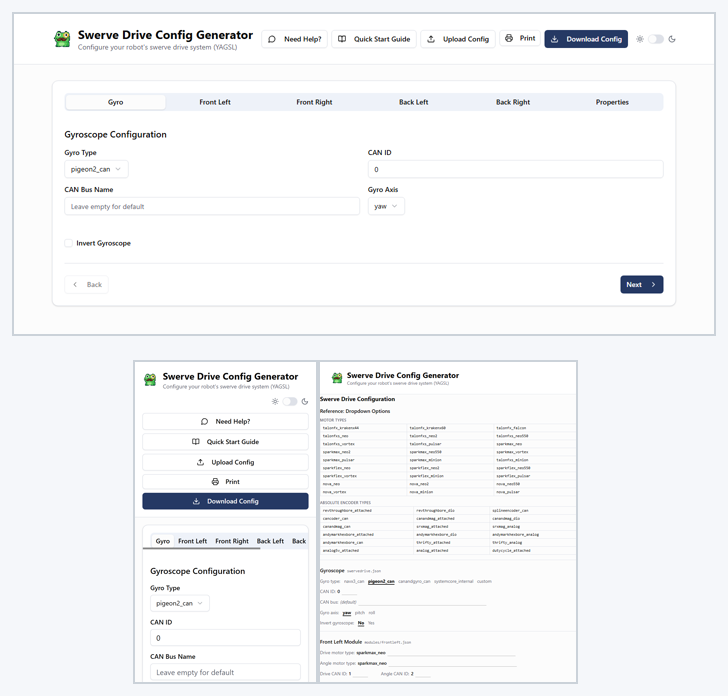
The config generator on a desktop, on a phone, and printed.
* **On a phone:** the whole generator works on a phone, so you can fill it in at the robot.
* **On paper:** **Print** prints every tab, with the dropdown options listed and a blank line for each value. Fill it in by hand, then type it in later.
* **Quick Start Guide:** **Download Config** opens the generator's Quick Start Guide, a printable checklist that takes you from the YAGSL example project, through tuning in simulation, to calibrating and tuning the real robot. It is the quickest way to spin up YAGSL; the rest of this tutorial explains the same steps in more depth.
{% hint style="info" %}
Hand-editing the JSON files is still possible and fully supported. See the [JSON Schema Reference](/reference/json-schema.md) if you need to script config generation or tweak a value the generator doesn't expose. Most teams should use the generator, though: it validates your inputs and always produces a schema-correct config.
{% endhint %}
## Fill in the form
The generator is organized into six tabs. Work through them using the information you collected in [step 1](/tutorial/01-gather-your-robot-information.md):
1. **Gyro**: select your gyro type (`pigeon2_can`, `canandgyro_can`, `navx3_can`, `systemcore_internal` for the IMU built into the SystemCore, or `custom` to supply your own in code), its CAN ID and CAN bus, which axis reports yaw, and whether it needs to be inverted. The SystemCore IMU is not on CAN, so the CAN fields disappear when you pick it. `navx3_can` cannot be used with YAGSL 2027 yet, because StudicaLib has no `2027_alpha7` build.
2. **Front Left**, **Front Right**, **Back Left**, **Back Right** (one tab each): for every module, set the drive motor type/ID, angle motor type/ID, absolute encoder type/ID (or channel, for an encoder on a SystemCore DIO or analog port), any needed inversions, and the module's location relative to the robot center. Thrifty Nova motor types (`nova_neo`, `nova_minion`, `nova_pulsar`, and so on) are in the motor list alongside TalonFX, TalonFXS, SparkMAX and SparkFlex.
3. **Properties**: shared physical properties (gearing defaults, current limits) and starting PIDF gains for the drive and angle motors.
### CAN bus fields
Every **CAN Bus** field takes the same values, whichever vendor made the device:
| CAN Bus value | Bus |
| --------------- | ----------------------------------------------------------- |
| empty | `can_s0`, the SystemCore's first CAN bus |
| `0` to `4` | `can_s0` to `can_s4`, so `1` is `can_s1` |
| `5` to `24` | The Motioncore buses `can_d0` to `can_d19` |
| a CANivore name | CTRE devices only (TalonFX, TalonFXS, CANcoder, Pigeon 2.0) |
The generator flags a bus number that does not exist, and a name on a device that only accepts a bus number (REV, Thrifty and Redux devices in the form).
{% hint style="warning" %}
CTRE devices with an empty CAN bus are on `can_s0`, like every other vendor. In YAGSL releases before `2026.10.09` they landed on Phoenix 6's own SystemCore default, `can_s2`. If your CTRE devices are wired to `can_s2`, enter `2`.
{% endhint %}
You can leave absolute encoder offsets and final PIDF gains at their defaults for now. You'll measure and tune those in the next two steps. The important thing at this stage is getting hardware types, IDs, CAN buses and module locations correct.
## Download and unzip
When you're done, click **Download Config**. You get `swerve-config.zip`, which has `swervedrive.json` and the `modules` folder at its top level. Create the folder `src/main/deploy/swerve/base` in your project and extract the zip's contents into it, so the layout looks like this:
```
src/main/deploy
└── swerve
└── base
├── swervedrive.json
└── modules
├── frontleft.json
├── frontright.json
├── backleft.json
├── backright.json
├── physicalproperties.json
├── pidfproperties.json
└── pidfproperties_sim.json
```
`pidfproperties_sim.json` starts as a copy of `pidfproperties.json`. YAGSL reads it in place of `pidfproperties.json` when the robot program runs in simulation, so you can tune simulation gains without touching the gains for your real robot.
{% hint style="info" %}
The folder name is up to you, as long as it matches the path you hand to `SwerveParser.parse(...)` in [step 5](/tutorial/05-deploy-and-drive.md). This tutorial uses `swerve/base` throughout.
{% endhint %}
{% hint style="success" %}
If you already have a config directory from a different robot, zip up its `swervedrive.json` and `modules` folder and use **Upload Config** to load it back into the generator to review or edit it, instead of starting from scratch. **Print** gives you a paper copy of the whole configuration for bring-up.
{% endhint %}
{% hint style="info" %}
Bringing a config forward from a release before `2026.10.09`? Check every `canbus` value against the table above: REV devices no longer accept port names such as `CAN_S1` (use `1`), and CTRE devices with an empty `canbus` moved from `can_s2` to `can_s0`.
{% endhint %}
Commit these files to your project's version control along with your code. They're part of your robot program, not a build artifact.
Next: [verify and calibrate your hardware](/tutorial/04-verify-and-calibrate-hardware.md).
---
# Agent Instructions
This documentation is published with GitBook. GitBook is the documentation platform designed so that both humans and AI agents can read, navigate, and reason over technical content effectively. Learn more at gitbook.com.
## Querying This Documentation
If you need additional information that is not directly available in this page, you can query the documentation by asking a question.
Perform an HTTP GET request on the following URL with the `ask` and `goal` query parameters:
```
GET https://yagsl.yassrobotics.com/tutorial/03-generate-your-configuration.md?ask=&goal=
```
`ask` is the immediate question: it should be specific, self-contained, and written in natural language.
`goal` is what the user is ultimately trying to achieve, the reason they need the answer. Sharing it helps GitBook give you a better, more relevant answer. A goal is most helpful when it describes the outcome the user wants rather than restating the question. For example, with `ask=how do I create an API token`, a goal like `automate deployments from our CI pipeline` lets GitBook tailor the answer to that use case.
The response will contain a direct answer to the question and relevant excerpts and sources from the documentation.
Use this mechanism when the answer is not explicitly present in the current page, you need clarification or additional context, or you want to retrieve related documentation sections.