> For the complete documentation index, see [llms.txt](https://yagsl.yassrobotics.com/llms.txt). Markdown versions of documentation pages are available by appending `.md` to page URLs; this page is available as [Markdown](https://yagsl.yassrobotics.com/tutorial/02-install-yagsl.md).

# Install YAGSL

## Add the YAGSL vendordep

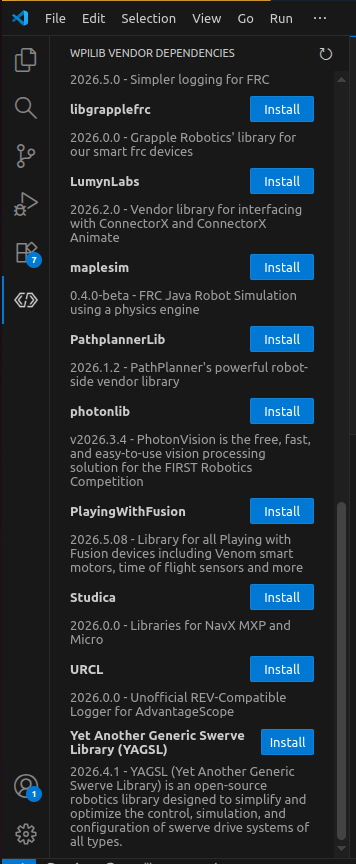
Installing YAGSL no longer requires typing a URL. Open the **WPILib Vendor Dependencies** panel in the VS Code sidebar (the WPILib extension icon) — YAGSL is listed directly in the catalog alongside the other common FRC vendor libraries (PathplannerLib, photonlib, REVLib, Studica, URCL, etc.). Click **Install** next to it.

<figure><img src="/files/RzptwWT6YJakdPiLCOoG" alt=""><figcaption><p>YAGSL listed directly in the WPILib Vendor Dependencies panel.</p></figcaption></figure>

If your WPILib version doesn't have YAGSL in that catalog yet, install it the manual way instead: open **Manage Vendor Libraries → Install new library (online)** and paste the URL:

```
https://yet-another-software-suite.github.io/YAGSL/yagsl/yagsl.json
```

Run a Gradle build afterward to pull down the library before continuing.

## Add vendordeps for your hardware

YAGSL wraps [YAMS](https://yams.yamgen.com/) and talks to hardware through each vendor's own library. Install a vendordep for every piece of hardware your robot actually uses — same panel as YAGSL, same one-click **Install**:

| Vendor         | Needed for                                 |
| -------------- | ------------------------------------------ |
| CTRE Phoenix 6 | TalonFX, TalonFXS, Pigeon 2.0, CANcoder    |
| CTRE Phoenix 5 | TalonSRX                                   |
| REVLib         | SparkMAX, SparkFlex                        |
| Studica        | NavX / NavX3                               |
| ReduxLib       | Canandgyro, Canandmag, Canandcoder         |
| maple-sim      | Physics simulation (optional, recommended) |

{% hint style="info" %}
If a vendor isn't in the panel's catalog yet on your WPILib version, install it the manual way instead — [installing 3rd-party libraries](https://docs.wpilib.org/en/stable/docs/software/vscode-overview/3rd-party-libraries.html#installing-libraries) covers pasting a URL, which you can get from the vendor's own install page.
{% endhint %}

{% hint style="warning" %}
Your vendor's hardware client (REV Hardware Client, Phoenix Tuner X) is a separate tool from the vendordep — install it too, it's needed for firmware updates and low-level device configuration.
{% endhint %}

Once your build succeeds with all vendordeps installed, move on to [generating your configuration](/tutorial/03-generate-your-configuration.md).


---

# Agent Instructions
This documentation is published with GitBook. GitBook is the documentation platform designed so that both humans and AI agents can read, navigate, and reason over technical content effectively. Learn more at gitbook.com.

## Querying This Documentation
If you need additional information that is not directly available in this page, you can query the documentation dynamically by asking a question.

Perform an HTTP GET request on the current page URL with the `ask` query parameter, and the optional `goal` query parameter:

```
GET https://yagsl.yassrobotics.com/tutorial/02-install-yagsl.md?ask=<question>&goal=<endgoal>
```

`ask` is the immediate question: it should be specific, self-contained, and written in natural language.
`goal` is optional and describes the broader end goal you are ultimately trying to accomplish on behalf of the user. GitBook uses it to tailor the answer towards what is most useful for that goal.

The response will contain a direct answer to the question and relevant excerpts and sources from the documentation.

Use this mechanism when the answer is not explicitly present in the current page, you need clarification or additional context, or you want to retrieve related documentation sections.
