> For the complete documentation index, see [llms.txt](https://yagsl.yassrobotics.com/llms.txt). Markdown versions of documentation pages are available by appending `.md` to page URLs; this page is available as [Markdown](https://yagsl.yassrobotics.com/tutorial/01-gather-your-robot-information.md).
# Gather your robot information
{% hint style="info" %}
Print the [config generator](https://config.yagsl.com) with its **Print** button and take it to the robot. Every tab prints on paper with the options listed and a blank line for each value, so you can fill it in as you gather this information and type it into the website later.
{% endhint %}
YAGSL is configured entirely from information about *your* robot. There is no universal constants file that works for everyone. Before opening [config.yagsl.com](https://config.yagsl.com), collect everything in this step. Having it all on hand up front saves you from re-measuring later.
{% hint style="warning" %}
Every swerve drive is different, even between robots using the same COTS modules (SDS MK4, MAXSwerve, etc.). Don't assume your numbers match another team's example.
{% endhint %}
## Hardware types and connections
| Feature | Notes |
| ------------------------------------------------------------- | ---------------------------------------------------------------------------------------------------------------------------------------------------------------------------------------------------------------------------------------------------------------------------------------- |
| Gyroscope model and connection | e.g. Pigeon 2.0 on CAN, Canandgyro on CAN, NavX3 on CAN (not usable with YAGSL 2027 yet, because StudicaLib has no `2027_alpha7` build), or the IMU built into the SystemCore (no wiring or CAN ID needed). |
| Drive motor + controller for each module | e.g. Kraken X60 on TalonFX, NEO on SparkMAX, NEO on a Thrifty Nova, etc. |
| Angle/steering motor + controller for each module | Same as above, per module. |
| Absolute encoder model and connection for each module | e.g. CANcoder on CAN, a REV Through Bore attached to the angle motor controller's data port, or an encoder wired to a SystemCore DIO or analog port (record the channel). |
| CAN bus of every CAN device | The SystemCore has several CAN buses, so record which one each device is wired to: `can_s0` (bus `0`, the default) through `can_s4` (bus `4`). CTRE devices on a [CANivore](https://store.ctr-electronics.com/canivore/) use the CANivore's configured name instead. See the note below. |
| CAN ID / channel of every motor controller, encoder, and gyro | Get this wrong and you'll be controlling the wrong device without realizing it. |
{% hint style="info" %}
Every device's `canbus` value is read the same way, whichever vendor made it: leave it empty for `can_s0`, or enter the bus number, `0` to `4` for `can_s0` to `can_s4` (so `1` is `can_s1`), and `5` to `24` for the Motioncore buses `can_d0` to `can_d19`. Only CTRE devices also accept a CANivore name. REV and Thrifty devices only accept a bus number.
{% endhint %}
## Physical characteristics
| Feature | Relevance |
| ------------------------- | -------------------------------------------------------------------------------------------------------------------------------------------------------- |
| Drive gear ratio | How many drive motor rotations produce one wheel rotation. Usually published by the module manufacturer. |
| Steering/angle gear ratio | How many steering motor rotations produce one full module rotation. Also published by the manufacturer. |
| Wheel diameter | Needed to convert motor rotations into distance traveled. |
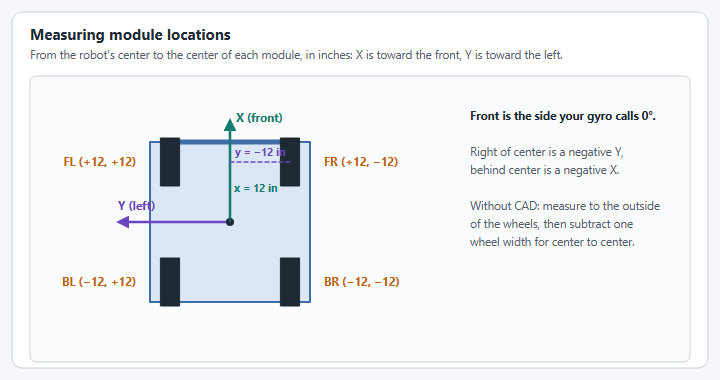
| Module locations | Distance in inches from the robot's center to each module's center, split into "front" (X) and "left" (Y) components. See below for how to measure this. |
### Measuring module locations
Module locations are from the robot's center to each module's center.
Measure in CAD if you can, for precision; otherwise, use this technique from Team 5010:
1. Lay the robot on its side and rotate the wheels perpendicular to the direction you're measuring.
2. Measure to the *outside* of each wheel and subtract one wheel width to get the center-to-center measurement.
3. Repeat in the other direction.
Record all four module locations (front-left, front-right, back-left, back-right) relative to the robot's center, in inches:
| Module | X "Front" (in) | Y "Left" (in) |
| ---------------- | -------------- | ------------- |
| Front Left (FL) | + | + |
| Front Right (FR) | + | − |
| Back Left (BL) | − | + |
| Back Right (BR) | − | − |
## Inversion and offsets: record placeholders now, fill in later
You won't be able to determine these until your code is deployed (that happens in [step 4](/tutorial/04-verify-and-calibrate-hardware.md)), but it helps to have a table ready:
| Module | Drive Inverted? | Angle Inverted? | Absolute Encoder Inverted? | Absolute Encoder Offset (°) |
| ---------------- | --------------- | --------------- | -------------------------- | --------------------------- |
| Front Left (FL) | | | | |
| Front Right (FR) | | | | |
| Back Left (BL) | | | | |
| Back Right (BR) | | | | |
Also note whether your gyroscope needs to be inverted. It must report an **increasing** yaw while the robot rotates counterclockwise.
{% hint style="info" %}
A printable version of a bring-up checklist covering all of the above (courtesy of DevilBotz 2876) is available in the repository's asset folder if your team prefers a paper checklist during bring-up.
{% endhint %}
With this information in hand, move on to [installing YAGSL](/tutorial/02-install-yagsl.md).
---
# Agent Instructions
This documentation is published with GitBook. GitBook is the documentation platform designed so that both humans and AI agents can read, navigate, and reason over technical content effectively. Learn more at gitbook.com.
## Querying This Documentation
If you need additional information that is not directly available in this page, you can query the documentation by asking a question.
Perform an HTTP GET request on the following URL with the `ask` and `goal` query parameters:
```
GET https://yagsl.yassrobotics.com/tutorial/01-gather-your-robot-information.md?ask=&goal=
```
`ask` is the immediate question: it should be specific, self-contained, and written in natural language.
`goal` is what the user is ultimately trying to achieve, the reason they need the answer. Sharing it helps GitBook give you a better, more relevant answer. A goal is most helpful when it describes the outcome the user wants rather than restating the question. For example, with `ask=how do I create an API token`, a goal like `automate deployments from our CI pipeline` lets GitBook tailor the answer to that use case.
The response will contain a direct answer to the question and relevant excerpts and sources from the documentation.
Use this mechanism when the answer is not explicitly present in the current page, you need clarification or additional context, or you want to retrieve related documentation sections.