> For the complete documentation index, see [llms.txt](https://yagsl.yassrobotics.com/llms.txt). Markdown versions of documentation pages are available by appending `.md` to page URLs; this page is available as [Markdown](https://yagsl.yassrobotics.com/how-to-guides/drive-to-a-pose.md).
# Drive to a pose
Command the robot to a field-relative Pose2d without PathPlanner.
`SwerveDrive.driveToPose(Pose2d)` drives straight to a field-relative pose using two PID controllers on `SwerveDriveConfig`. No path planning is involved, just "go here." It's a good fit for short, single-target moves: aligning to a scoring location, a loading station, or a fixed AprilTag-relative setpoint. For multi-point autonomous routines with obstacle-aware paths, see [How to set up PathPlanner](/how-to-guides/setup-pathplanner.md) instead (Commands v2 only; on Commands v3 `driveToPose` is what you have).
{% hint style="warning" %}
`driveToPose` is **not compatible with AdvantageKit** replay (per its javadoc), because it reads gyro/pose state live inside the command rather than through a logged input.
{% endhint %}
## 1. Give the drive translation and rotation controllers
`SwerveParser` doesn't set these for you. There's no JSON field for them, since they're a robot-code concern, not a per-robot hardware description. Set them on the `SwerveDriveConfig` before calling `createSwerveDrive(...)`:
{% tabs %}
{% tab title="Commands v2" %}
```java
import org.wpilib.math.controller.PIDController;
import swervelib.commands2.SwerveParser;
import yams.commands2.config.SwerveDriveConfig;
import yams.core.telemetry.SwerveDriveTelemetryConfig;
import yams.core.telemetry.enums.TelemetryVerbosity;
var cfg = new SwerveDriveConfig()
.withStartingPose(new Pose2d(3, 3, Rotation2d.ZERO))
.withSubsystem(this)
.withTranslationController(new PIDController(4, 0, 0)) // input: meters of position error
.withRotationController(new PIDController(3, 0, 0)) // input: radians of heading error
.withTelemetry("swerve", new SwerveDriveTelemetryConfig(TelemetryVerbosity.HIGH));
SwerveParser.parse(new File(Filesystem.getDeployDirectory(), "swerve/base"));
drive = SwerveParser.createSwerveDrive(cfg);
```
{% endtab %}
{% tab title="Commands v3" %}
```java
import org.wpilib.math.controller.PIDController;
import swervelib.commands3.SwerveParser;
import yams.commands3.config.SwerveDriveConfig;
import yams.core.telemetry.SwerveDriveTelemetryConfig;
import yams.core.telemetry.enums.TelemetryVerbosity;
var cfg = new SwerveDriveConfig()
.withStartingPose(new Pose2d(3, 3, Rotation2d.ZERO))
.withMechanism(this)
.withTranslationController(new PIDController(4, 0, 0)) // input: meters of position error
.withRotationController(new PIDController(3, 0, 0)) // input: radians of heading error
.withTelemetry("swerve", new SwerveDriveTelemetryConfig(TelemetryVerbosity.HIGH));
SwerveParser.parse(new File(Filesystem.getDeployDirectory(), "swerve/base"));
drive = SwerveParser.createSwerveDrive(cfg);
```
{% endtab %}
{% endtabs %}
The gains above are the YAGSL examples' placeholders, not values tuned for your robot. The translation controller's output is a speed toward the target in meters per second; the rotation controller's is radians per second. To use different gains in simulation, add `withSimTranslationController(...)`/`withSimRotationController(...)`.
{% hint style="danger" %}
If a `driveToPose` command runs without both controllers set, YAMS throws a `SwerveDriveConfigurationException` rather than silently picking a default, since an untuned default would just as likely fight the robot as help it.
{% endhint %}
{% hint style="info" %}
YAMS stops any module asked for less than 0.1 m/s (its default module velocity deadband), so a rotation gain that's too low leaves the robot a few degrees short of the heading you asked for and unable to close the rest. At `kP = 3` that dead zone is under 4.5 degrees.
{% endhint %}
The rotation controller is the same one `SwerveInputStream`'s heading control uses (see [Heading Correction](/explanation/module-behaviors.md#heading-correction-heading-snap-control)). If you've already tuned heading control, you have a reasonable starting point for `driveToPose` too. Both controllers can be tuned live from a dashboard, see [live tuning](/how-to-guides/tune-pidf-gains.md#live-tuning).
## 2. Wrap it in a command that knows when to stop
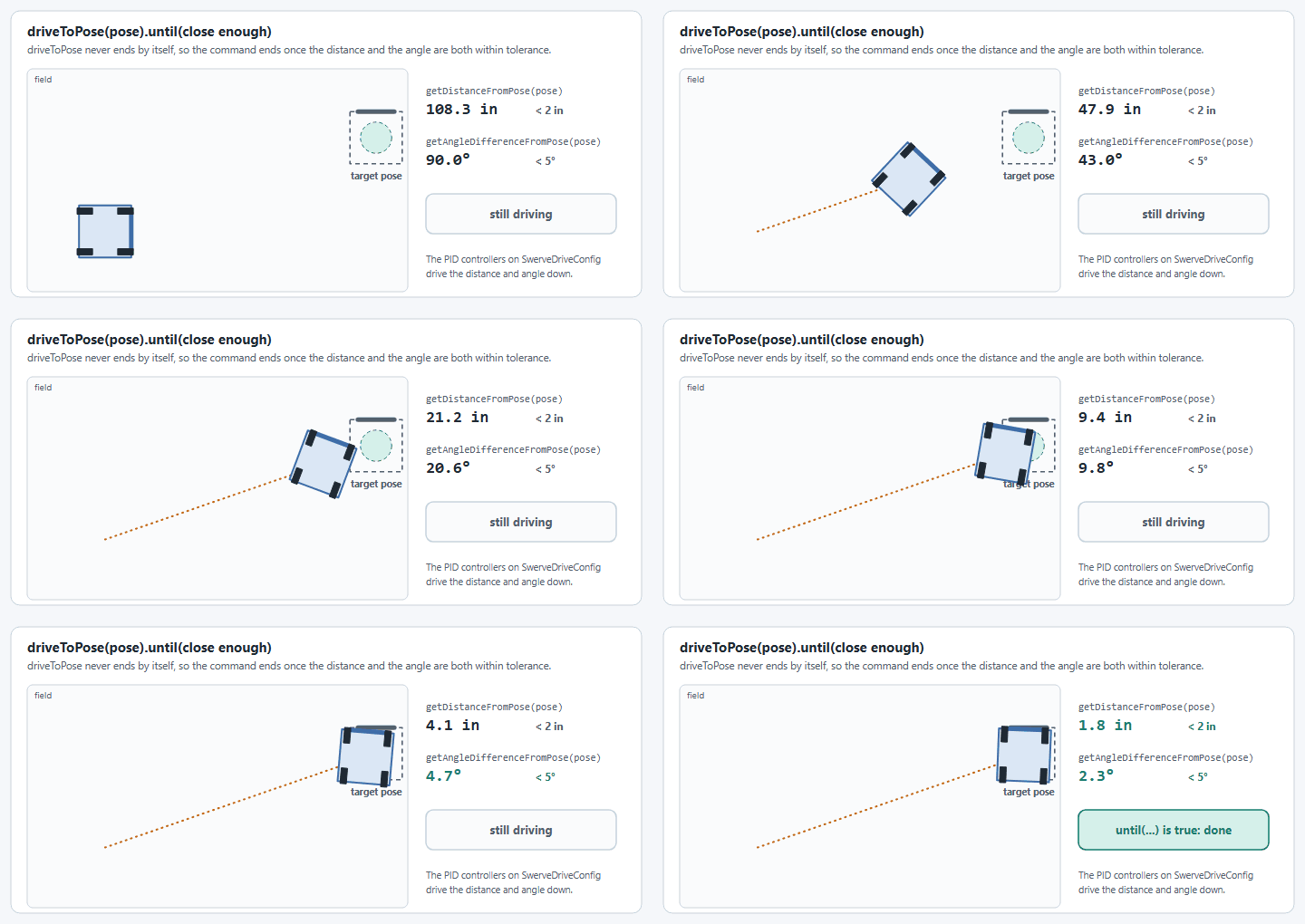
`driveToPose(Pose2d)` never finishes on its own. It keeps correcting toward the target pose until something cancels it, the same way your teleop default command never finishes.
The command ends once the robot is within both tolerances.
{% tabs %}
{% tab title="Commands v2" %}
Race it against a tolerance check (or a timeout) so it actually ends:
```java
import static org.wpilib.units.Units.Degrees;
import static org.wpilib.units.Units.Inches;
public Command driveToPose(Pose2d pose) {
return drive.driveToPose(pose)
.until(() -> drive.getDistanceFromPose(pose).in(Inches) < 2
&& Math.abs(drive.getAngleDifferenceFromPose(pose).in(Degrees)) < 5);
}
```
`SwerveDrive.getDistanceFromPose(Pose2d)` and `getAngleDifferenceFromPose(Pose2d)` give you the current translation/rotation error against any pose, so the tolerance check above works for any target, not just the one you started the command with.
{% endtab %}
{% tab title="Commands v3" %}
The Commands v3 `SwerveDrive` has a second overload that ends by itself once the robot is within tolerance, and stops the drive when it ends or is canceled:
```java
import static org.wpilib.units.Units.Degrees;
import static org.wpilib.units.Units.Inches;
public Command driveToPose(Pose2d pose) {
return drive.driveToPose(pose, Inches.of(2), Degrees.of(5));
}
```
To chain several poses, await each one inside a coroutine, the way the Commands v3 example's `driveRelativeWaypoints` does:
```java
public Command driveSquare(List poses) {
return run(coroutine -> {
for (Pose2d pose : poses) {
coroutine.await(driveToPose(pose));
}
}).named("Drive Square");
}
```
`drive.isNear(pose, translationTolerance, rotationTolerance)` is the same check the overload uses, if you want it in your own loop.
{% hint style="info" %}
The tolerance overload ends as soon as the robot is inside the tolerance, even if it's still moving. To settle on a final pose, finish with the plain `drive.driveToPose(pose)`, which holds the pose until it is canceled.
{% endhint %}
{% endtab %}
{% endtabs %}
If you'd rather hold at the pose indefinitely (for example while a button is held), skip the tolerance and let whatever takes over next interrupt it. That's exactly what a bare `drive.driveToPose(pose)` does.
## 3. Bind it
{% tabs %}
{% tab title="Commands v2" %}
```java
driverXbox.y().whileTrue(swerve.driveToPose(new Pose2d(3, 3, Rotation2d.fromDegrees(180))));
```
{% endtab %}
{% tab title="Commands v3" %}
```java
driverXbox.y().whileTrue(robot.swerve.driveToPose(new Pose2d(3, 3, Rotation2d.fromDegrees(180))));
```
{% endtab %}
{% endtabs %}
Pass a fixed pose for a known field feature, or a pose computed on the fly (from vision, or the nearest of a set of candidate poses). `driveToPose` doesn't care where the `Pose2d` came from.
{% hint style="info" %}
The pose is field-relative with the blue-alliance wall as the origin, `0°` facing the red alliance wall, the same convention `SwerveDrive.getPose()`/odometry already use. If you're computing poses per-alliance, flip them yourself for the red alliance; `driveToPose` does not.
{% endhint %}
---
# Agent Instructions
This documentation is published with GitBook. GitBook is the documentation platform designed so that both humans and AI agents can read, navigate, and reason over technical content effectively. Learn more at gitbook.com.
## Querying This Documentation
If you need additional information that is not directly available in this page, you can query the documentation by asking a question.
Perform an HTTP GET request on the following URL with the `ask` and `goal` query parameters:
```
GET https://yagsl.yassrobotics.com/how-to-guides/drive-to-a-pose.md?ask=&goal=
```
`ask` is the immediate question: it should be specific, self-contained, and written in natural language.
`goal` is what the user is ultimately trying to achieve, the reason they need the answer. Sharing it helps GitBook give you a better, more relevant answer. A goal is most helpful when it describes the outcome the user wants rather than restating the question. For example, with `ask=how do I create an API token`, a goal like `automate deployments from our CI pipeline` lets GitBook tailor the answer to that use case.
The response will contain a direct answer to the question and relevant excerpts and sources from the documentation.
Use this mechanism when the answer is not explicitly present in the current page, you need clarification or additional context, or you want to retrieve related documentation sections.