> For the complete documentation index, see [llms.txt](https://yagsl.yassrobotics.com/llms.txt). Markdown versions of documentation pages are available by appending `.md` to page URLs; this page is available as [Markdown](https://yagsl.yassrobotics.com/how-to-guides/determine-inversion.md).
# Determine inversion
Work out which motors, encoders, and the gyro need to be inverted.
Swerve modules and swerve drives require some inversions to get working properly. The goal is to get everything to increase **counter-clockwise positive (CCW+)**.
{% hint style="info" %}
[config.yagsl.com/guide](https://config.yagsl.com/guide) walks through this exact process interactively, with animations, if you'd rather follow along there instead of on this page.
{% endhint %}
{% hint style="warning" %}
If your gears are grinding on the ground but not while on blocks, and your wheels are facing and spinning in the right directions, you may need to [tune PID](/how-to-guides/tune-pidf-gains.md) instead of inverting anything.
{% endhint %}
{% hint style="warning" %}
If you invert incorrectly, your modules or robot may spin "out of control." If nothing here resolves it, see [The 8 steps](/how-to-guides/the-8-steps.md).
{% endhint %}
All of the telemetry referenced below lives under `Mechanisms/swerve` in NetworkTables. See [Telemetry, Simulation & Vision](/explanation/telemetry-and-vision.md) for the full tree.
## 1. Confirm the absolute encoder reads CCW+
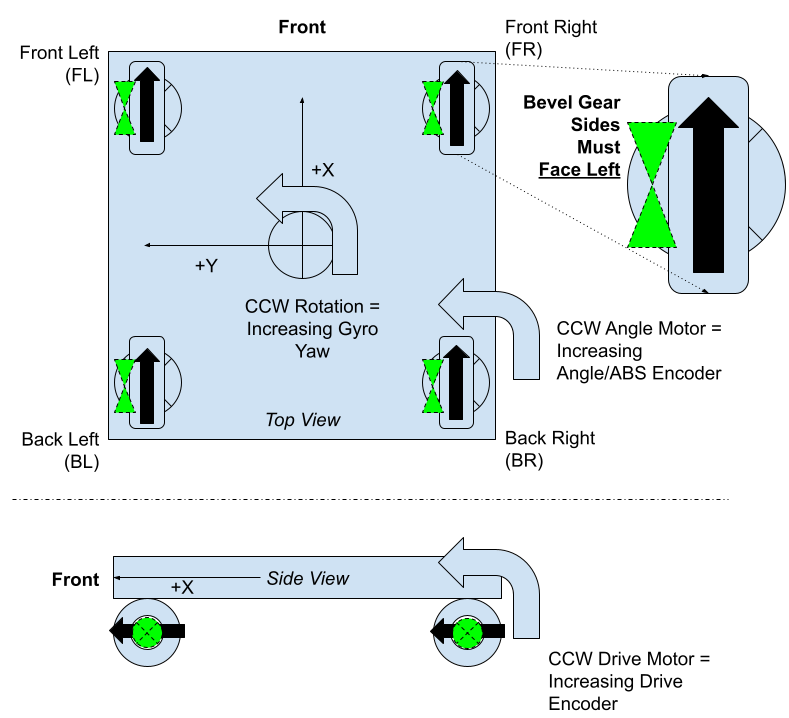
Purple shows the way your bevels should be facing (photo by Team 2876)
With the robot lifted or on its side so the wheels spin freely, rotate one module by hand **counterclockwise** (viewed from directly above, robot front pointing away from you) and watch that module's `modules//encoder` value in AdvantageScope.
* If it **increases**, the absolute encoder is already correct; leave `absoluteEncoderInverted` as `false`.
* If it **decreases**, set `absoluteEncoderInverted` to `true` for that module. This is rare because most absolute encoders already read CCW+ by default.
```json
{
"drive": { "type": "sparkmax_neo", "id": 2, "canbus": "" },
"angle": { "type": "sparkmax_neo", "id": 1, "canbus": "" },
"absoluteEncoder": { "type": "cancoder_can", "id": 10, "channel": 0, "canbus": "" },
"inverted": { "drive": false, "angle": false },
"absoluteEncoderInverted": true,
"absoluteEncoderOffset": -50.977,
"location": { "front": 12, "left": -12 }
}
```
Once every module reads CCW+, rotate each wheel to point straight forward (bevel gear left) and record the `modules//encoder` value held in that position. That's the module's `absoluteEncoderOffset`. Enter it in the module's JSON, or paste it into [**config.yagsl.com**](https://config.yagsl.com).
## 2. Confirm the gyro reads CCW+
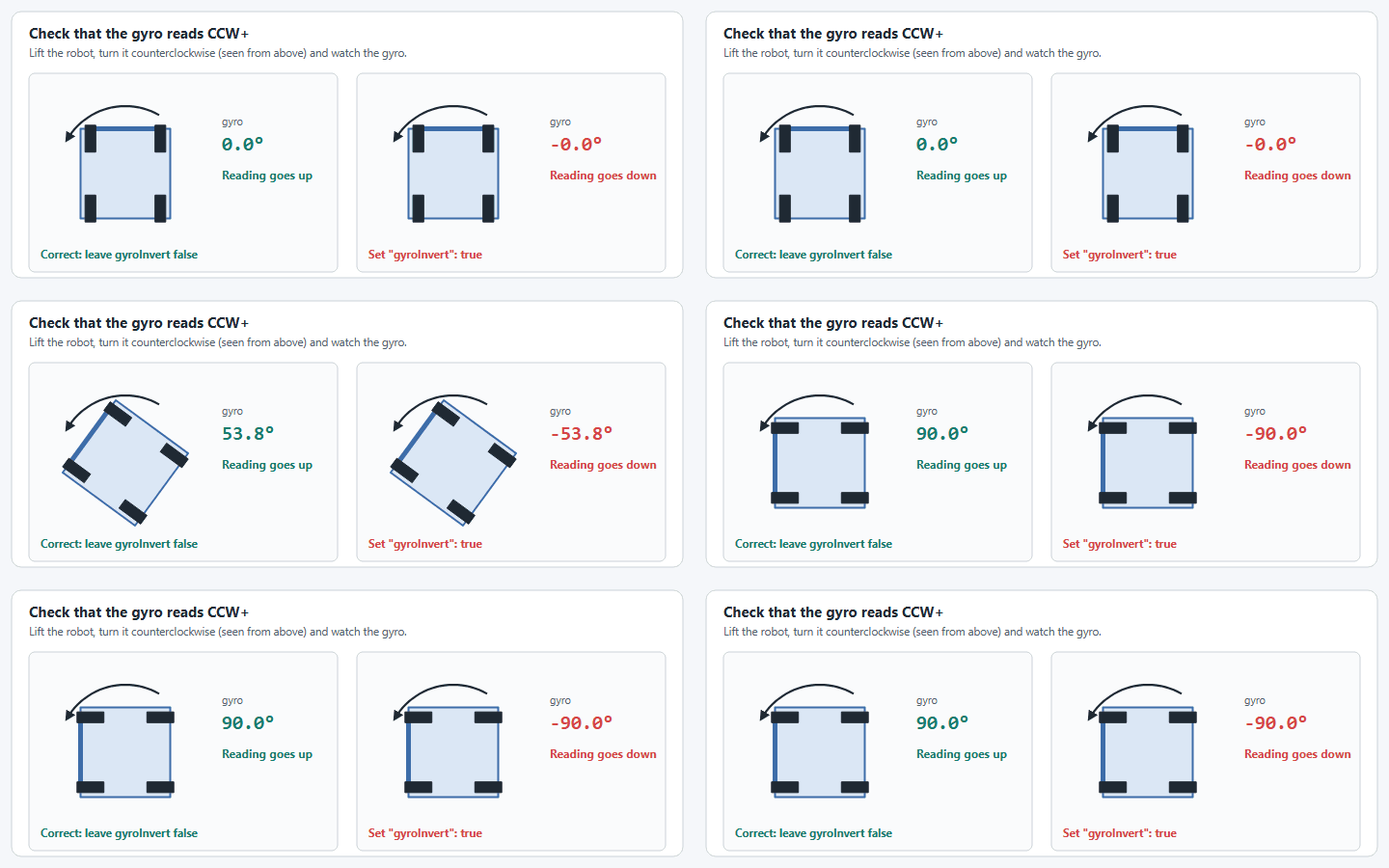
With the robot lifted off the ground, rotate the **entire robot** counterclockwise (viewed from above) and watch `Mechanisms/swerve/gyro`.
Turn the robot counterclockwise: the gyro should go up.
* If it **increases**, leave `gyroInvert` alone; there's nothing to change.
* If it **decreases**, set `gyroInvert` to `true` in `swervedrive.json`:
```json
{
"gyro": { "type": "pigeon2_can", "id": 13, "canbus": "canivore" },
"gyroAxis": "yaw",
"gyroInvert": true,
"modules": ["frontleft.json", "frontright.json", "backleft.json", "backright.json"]
}
```
See the [gyroscope reference](/reference/hardware/gyroscopes.md) for the full list of supported `gyro.type` values.
{% hint style="info" %}
If the gyro is mounted on its side, so that turning the robot shows up as the sensor's roll or pitch, set `gyroAxis` to `roll` or `pitch` first and then run this check. `gyroInvert` is applied to the heading after the axis is chosen. Both are ignored for a [`custom` gyro](/how-to-guides/use-a-custom-gyro.md), which sets them in Java instead.
{% endhint %}
{% hint style="warning" %}
Re-run this check after updating to YAGSL 2027, especially with a Redux Canandgyro. Older releases inverted a Canandgyro's heading twice; inversion is now applied exactly once, by `gyroInvert`, so a config that compensated for the old behavior needs `gyroInvert` flipped.
{% endhint %}
## 3. Spin test: catch drive motor inversion and module swaps
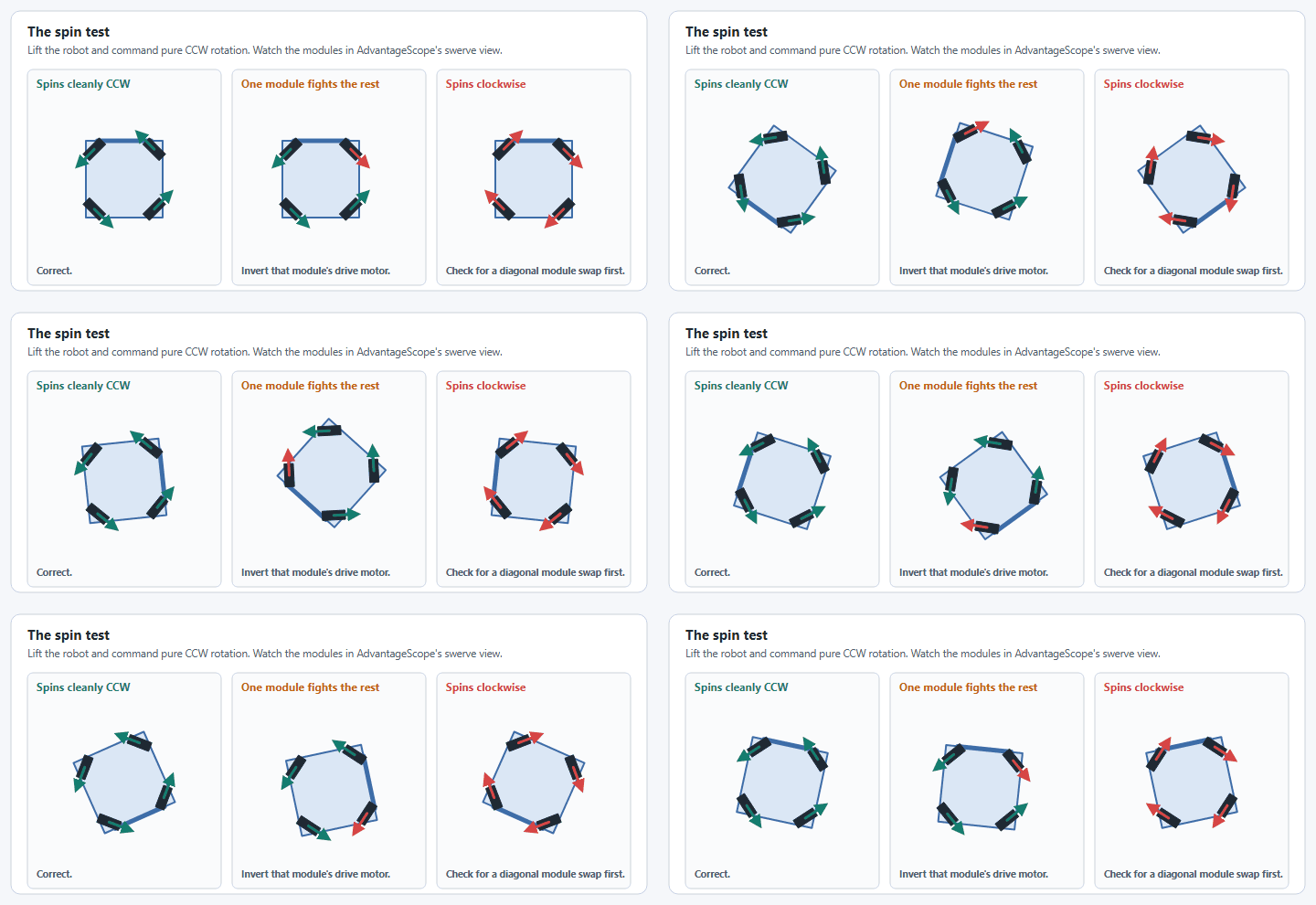
Still with the robot lifted off the ground, deploy code and drive with a joystick input that commands pure rotation (e.g. hold the rotation stick fully to one side). Watch the robot against AdvantageScope's Swerve widget (top-down view; see [Set up AdvantageScope](/how-to-guides/set-up-advantagescope.md)) and compare:
What the spin test can look like.
| Symptom | Likely cause |
| --------------------------------------------------------------- | -------------------------------------------------------------------------------------------------------------------------------------------------------------------------------------------- |
| Modules drift or translate instead of spinning cleanly in place | Wrong CAN IDs for a module, or a wrong `absoluteEncoderOffset`. |
| Spins cleanly, but the wrong way (clockwise instead of CCW) | Inverted drive motor(s); a diagonal module swap (front-left ↔ back-right, front-right ↔ back-left); or an absolute encoder offset captured with the bevel gear facing right instead of left. |
If a single module is spinning the wrong way, invert that module's drive motor:
```json
{
"drive": { "type": "sparkmax_neo", "id": 2, "canbus": "" },
"angle": { "type": "sparkmax_neo", "id": 1, "canbus": "" },
"absoluteEncoder": { "type": "cancoder_can", "id": 10, "channel": 0, "canbus": "" },
"inverted": { "drive": true, "angle": false },
"absoluteEncoderInverted": false,
"absoluteEncoderOffset": -50.977,
"location": { "front": 12, "left": -12 }
}
```
If every module spins the wrong way at once, double-check for a diagonal module swap in `swervedrive.json`'s `modules` list before you start flipping individual `inverted.drive` fields. It's a more common cause than it sounds.
## 4. Field-orientation check
Once the spin test looks right, put the robot down and drive it forward/back/left/right at its starting heading while watching a 2D/3D Field tab fed from `Mechanisms/swerve/pose`. Then spin in place again, this time watching the field widget's heading instead of the swerve module widget.
* **Wrong at every heading, including the start:** check `gyroInvert`.
* **Only wrong once you rotate away from the starting heading:** an absolute encoder offset that's off, a drive motor inversion mistake, a wrong module `location`, an absolute encoder wired to the wrong motor controller, or a wrong CAN ID. Verify wiring and CAN IDs first because they're the fastest to rule out.
* **The spin test in step 3 looked right, but the field widget's heading spins backwards:** an inverted gyro can flip the field widget even when the module states widget looked correct.
{% hint style="danger" %}
#### Odometry mismatch
If your robot drives backwards in odometry but forwards in real life, while a spin-in-place still shows Counter-Clockwise-Positive movement, apply this patch: add `180` to every `absoluteEncoderOffset` in every module file.
{% endhint %}
{% hint style="info" %}
In older YAGSL configs (pre-2026.8.05) this section was named `imu`/`invertedIMU` instead of `gyro`/`gyroInvert`. See the [schema changes reference](/reference/schema-changes.md) if you're working from an old config.
{% endhint %}
---
# Agent Instructions
This documentation is published with GitBook. GitBook is the documentation platform designed so that both humans and AI agents can read, navigate, and reason over technical content effectively. Learn more at gitbook.com.
## Querying This Documentation
If you need additional information that is not directly available in this page, you can query the documentation by asking a question.
Perform an HTTP GET request on the following URL with the `ask` and `goal` query parameters:
```
GET https://yagsl.yassrobotics.com/how-to-guides/determine-inversion.md?ask=&goal=
```
`ask` is the immediate question: it should be specific, self-contained, and written in natural language.
`goal` is what the user is ultimately trying to achieve, the reason they need the answer. Sharing it helps GitBook give you a better, more relevant answer. A goal is most helpful when it describes the outcome the user wants rather than restating the question. For example, with `ask=how do I create an API token`, a goal like `automate deployments from our CI pipeline` lets GitBook tailor the answer to that use case.
The response will contain a direct answer to the question and relevant excerpts and sources from the documentation.
Use this mechanism when the answer is not explicitly present in the current page, you need clarification or additional context, or you want to retrieve related documentation sections.