> For the complete documentation index, see [llms.txt](https://yagsl.yassrobotics.com/llms.txt). Markdown versions of documentation pages are available by appending `.md` to page URLs; this page is available as [Markdown](https://yagsl.yassrobotics.com/explanation/chassis-control.md).
# Chassis Control
Chassis-level speed limiting, discretization, and lock pose
Beyond individual module behavior, `SwerveDrive` and `SwerveDriveConfig` control a few chassis-wide concerns: how fast the robot is allowed to go, how commanded velocities get corrected for a subtle simulation-of-motion error, and how to make the robot maximally hard to push.
## Max Speed
YAMS stores a maximum module speed, plus an optional maximum chassis linear and angular speed, and uses them for `SwerveDriveKinematics.desaturateWheelVelocities`: scaling down all module speeds proportionally if any one module would need to exceed the physical maximum.
`SwerveParser` works out the maximum module speed for you from each drive motor's free speed, its gear ratio and the wheel diameter, and applies the slowest module's value with `SwerveDriveConfig.withMaximumModuleSpeed(...)`, so every module can reach what it is asked for. The same number gives the drive motors a default feedforward `kV` when `pidfproperties.json` leaves the drive `v` at `0`.
The maximum speed represents the physical maximum speed of the robot. It is not a "slow mode" throttle (use `SwerveInputStream.withScaleTranslation`/`withScaleRotation`, or scale your controller input directly, for that).
To also cap the chassis as a whole, set it once via `SwerveDriveConfig.withMaximumChassisSpeed(LinearVelocity, AngularVelocity)`:
```java
var cfg = new SwerveDriveConfig()
.withMaximumChassisSpeed(MetersPerSecond.of(4.5), DegreesPerSecond.of(360));
```
{% hint style="info" %}
This is a setting on `SwerveDriveConfig`, not a JSON field. Set it in the code that builds your `SwerveDriveConfig` before passing it to `SwerveParser.createSwerveDrive(...)`.
{% endhint %}
## Chassis Speed Discretization
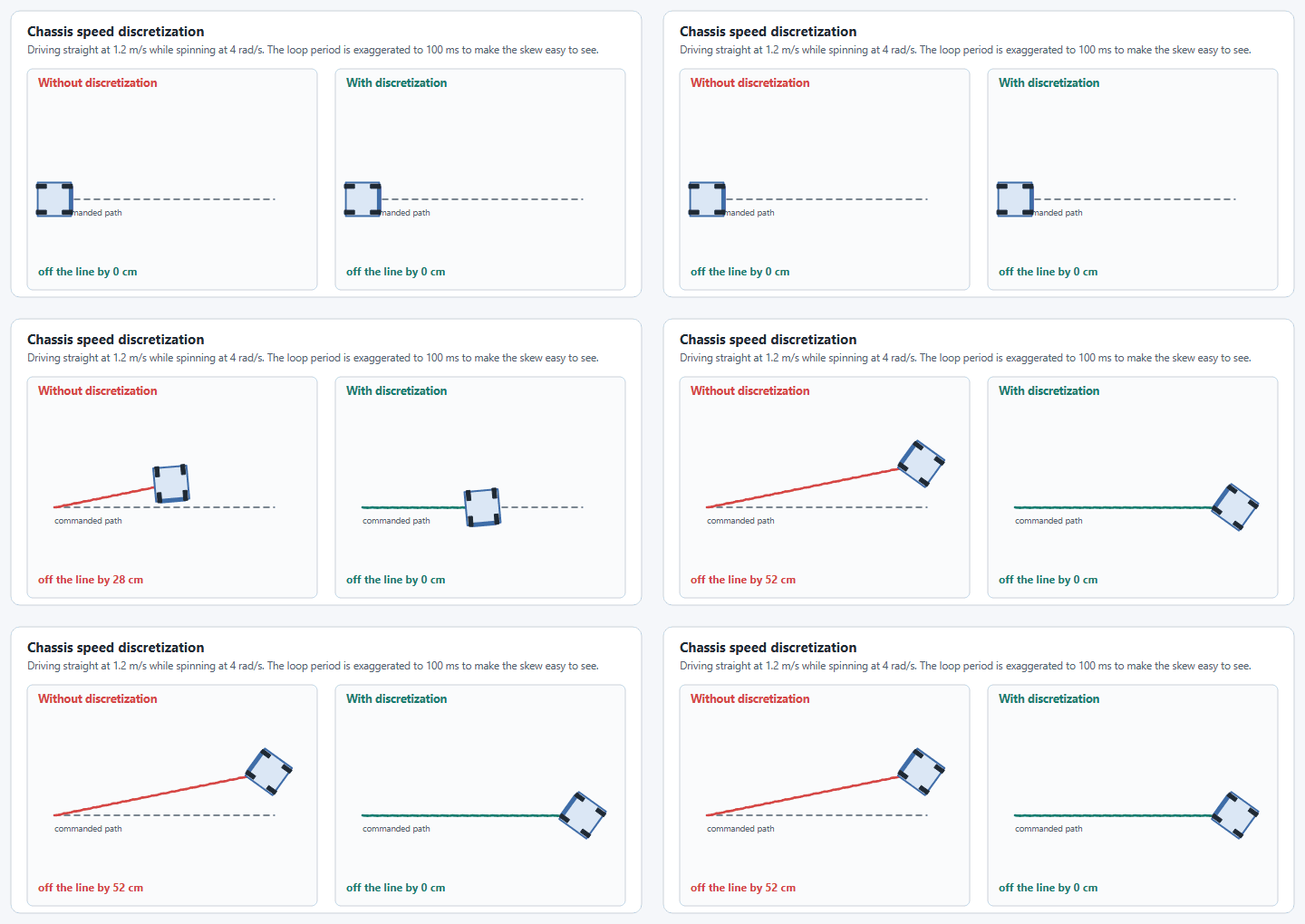
When you command a `ChassisVelocities` (WPILib 2027's name for `ChassisSpeeds`) with both translation and rotation, WPILib's `SwerveDriveKinematics` computes module states assuming that velocity is held constant for the whole next timestep. In reality your loop runs at a discrete rate (typically 20ms), and the true path curves slightly within that window. This shows up as unwanted skew/drift, especially at higher rotation rates.
Driving straight while spinning, without and with discretization.
`ChassisVelocities.discretize(dt)` corrects for this by working out what constant-velocity command over `dt` would actually produce the desired end pose. YAMS applies this automatically once a discretization time is set:
```java
var cfg = new SwerveDriveConfig()
.withDiscretizationTime(Seconds.of(0.02))
.withSimDiscretizationTime(Seconds.of(0.02)); // optionally different for simulation
```
You don't need to write this yourself when you use YAGSL: `SwerveParser.createSwerveDrive(...)` sets both the real and the simulation discretization time to 20 ms (matching the default robot loop period) on the `SwerveDriveConfig` you hand it, replacing any value you set beforehand. The builder calls above matter when you construct a `SwerveDriveConfig` without `SwerveParser`, where no discretization correction is applied unless you set a time.
## Lock Pose
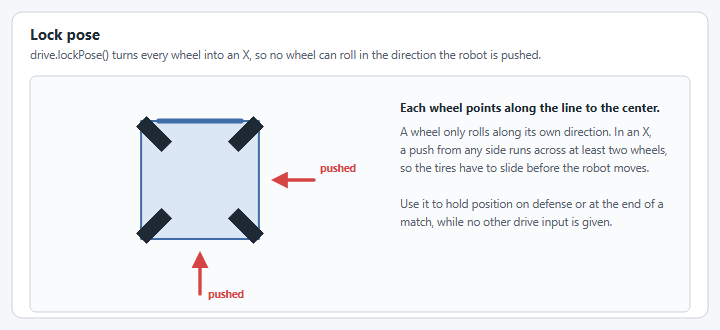
Lock Pose is a special stance where all the wheels point inward into an X formation, making the robot extremely difficult to push. It's most useful for holding position during defense, or at the end of a match.
Lock pose: every wheel points at the center.
```java
drive.lockPose();
```
{% hint style="warning" %}
Lock Pose should only be used when no other drive input is given, or you may get undefined/fighting behavior between the lock and your normal drive command.
{% endhint %}
A typical binding calls it repeatedly while a button is held:
{% tabs %}
{% tab title="Commands v2" %}
```java
driverXbox.x().whileTrue(Commands.run(drive::lockPose, driveSubsystem).withName("Lock Pose"));
```
{% endtab %}
{% tab title="Commands v3" %}
```java
// In your swerve Mechanism:
public Command lockPose()
{
return run(coroutine -> {
while (true)
{
drive.lockPose();
coroutine.yield();
}
}).named("Lock Pose");
}
// In your teleop opmode:
driverXbox.x().whileTrue(robot.swerve.lockPose());
```
{% endtab %}
{% endtabs %}
---
# Agent Instructions
This documentation is published with GitBook. GitBook is the documentation platform designed so that both humans and AI agents can read, navigate, and reason over technical content effectively. Learn more at gitbook.com.
## Querying This Documentation
If you need additional information that is not directly available in this page, you can query the documentation by asking a question.
Perform an HTTP GET request on the following URL with the `ask` and `goal` query parameters:
```
GET https://yagsl.yassrobotics.com/explanation/chassis-control.md?ask=&goal=
```
`ask` is the immediate question: it should be specific, self-contained, and written in natural language.
`goal` is what the user is ultimately trying to achieve, the reason they need the answer. Sharing it helps GitBook give you a better, more relevant answer. A goal is most helpful when it describes the outcome the user wants rather than restating the question. For example, with `ask=how do I create an API token`, a goal like `automate deployments from our CI pipeline` lets GitBook tailor the answer to that use case.
The response will contain a direct answer to the question and relevant excerpts and sources from the documentation.
Use this mechanism when the answer is not explicitly present in the current page, you need clarification or additional context, or you want to retrieve related documentation sections.