> For the complete documentation index, see [llms.txt](https://yagsl.yassrobotics.com/llms.txt). Markdown versions of documentation pages are available by appending `.md` to page URLs; this page is available as [Markdown](https://yagsl.yassrobotics.com/readme.md).
# Welcome to YAGSL
Brought to you by Yet Another Generic Swerve Library (YAGSL)
{% hint style="warning" %}
If your swerve drive uses only [Falcon500](https://store.ctr-electronics.com/falcon-500-powered-by-talon-fx/)/[Kraken](https://store.ctr-electronics.com/kraken-x60/)/[TalonFXS](https://store.ctr-electronics.com/products/talon-fxs), [Pigeon2.0](https://store.ctr-electronics.com/pigeon-2/), and [CANCoder](https://store.ctr-electronics.com/cancoder/) from [CTRE](https://pro.docs.ctr-electronics.com/en/latest/index.html) please also consider the [Tuner X Swerve Drive Generator](https://pro.docs.ctr-electronics.com/en/latest/docs/tuner/tuner-swerve/index.html).
{% endhint %}
## Overview
YAGSL is a Swerve Library developed by current and former BroncBotz mentors for all FRC teams. YAGSL is a JSON configuration parser that builds a [YAMS](https://yams.yamgen.com/) `SwerveDrive` for your robot: describe your hardware once, generate the config at [**config.yagsl.com**](https://config.yagsl.com), and drive. See [What is YAGSL?](/explanation/what-is-yagsl.md) for how the pieces fit together.
{% hint style="success" %}
YAGSL 2027 is built on WPILib 2027 (`2027_alpha7`, Java 25) and runs on the SystemCore. It supports both WPILib Commands v2 and Commands v3, each with its own vendordep. See the [Changelog](/explanation/changelog.md) for what changed in the 2027 port.
{% endhint %}
{% embed url="" %}
## This documentation is organized into four sections
* [**Tutorial**](/tutorial/tutorial.md): never used YAGSL before? Start here. A single linear walkthrough from a bare WPILib project to a driving swerve robot.
* [**How-to Guides**](/how-to-guides/how-to.md): already have a robot running? Task-focused recipes for tuning PIDF, determining inversion, diagnosing drift, and other work you'll come back to.
* [**Reference**](/reference/reference.md): precise JSON schema field tables, supported hardware type strings, and where to find the YAMS API docs.
* [**Explanation**](/explanation/explanation.md): swerve drive theory and the reasoning behind how YAGSL and YAMS behave.
{% hint style="info" %}
Upgrading an existing robot from before **2026.8.05**? Your `swerve/` config directory uses the old schema. See [Schema Changes](/reference/schema-changes.md) before you do anything else.
{% endhint %}
## Get started
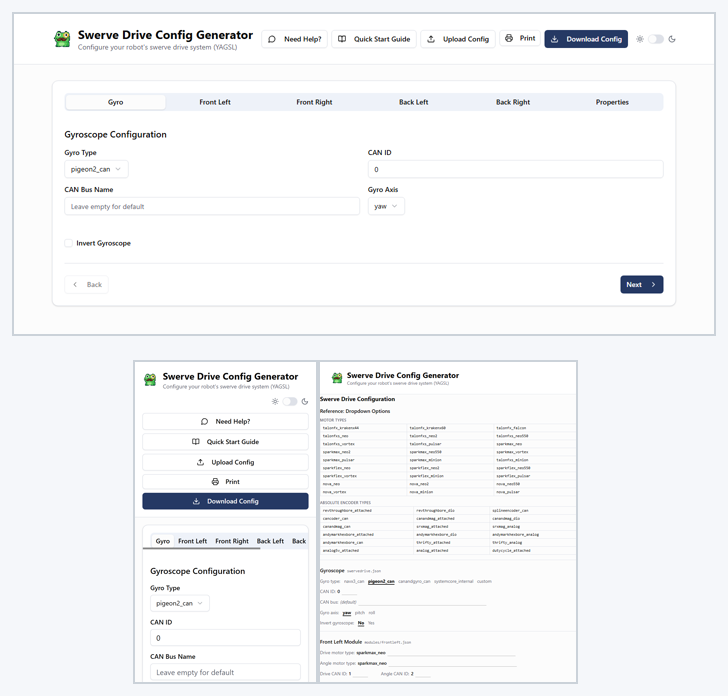
The quickest way to spin up YAGSL is the [config generator](https://config.yagsl.com) and its **Quick Start Guide**. Fill in the generator's form, press **Download Config**, and the Quick Start Guide walks you through the rest, one checklist at a time: copy the YAGSL example project, drop your config into it, tune it in simulation, then calibrate and tune the real robot.
The generator works on a phone too, and its **Print** button prints the whole form, so you can fill it in on paper at the robot and type it in later.
The config generator on a desktop, on a phone, and printed.
The [tutorial](/tutorial/tutorial.md) covers the same ground in more detail, including adding YAGSL to a project you already have.
{% embed url="" %}
{% content-ref url="/pages/VUjPRU3oP9Kpxefm9ap7" %}
[Your First Swerve Robot](/tutorial/tutorial.md)
{% endcontent-ref %}
{% content-ref url="/pages/QcM0FunHvaMONGWx5YYK" %}
[Tune PIDF gains](/how-to-guides/tune-pidf-gains.md)
{% endcontent-ref %}
{% content-ref url="/pages/VLPyZoQy6yIAwWwW5pmV" %}
[The 8 steps](/how-to-guides/the-8-steps.md)
{% endcontent-ref %}
{% content-ref url="/pages/kLO6AjaFJTb3Q1dvCozW" %}
[Schema Changes (Migrating to 2027 and from pre-2026.8.05)](/reference/schema-changes.md)
{% endcontent-ref %}
## YAGSL Online Installation
Install **exactly one** of these vendordeps, matching the WPILib command framework your robot uses (they conflict with each other):
| Command framework | Vendordep URL |
| ----------------- | --------------------------------------------------- |
| Commands v2 | `https://cdn.yassrobotics.com/yagsl_commands2.json` |
| Commands v3 | `https://cdn.yassrobotics.com/yagsl_commands3.json` |
Each one requires only the matching [YAMS](https://yams.yamgen.com/) vendordep (`https://cdn.yassrobotics.com/yams_commands2.json` or `https://cdn.yassrobotics.com/yams_commands3.json`). Vendor libraries such as REVLib, Phoenix 6, ReduxLib and ThriftyLib are only needed for the hardware your robot actually has. See [Install YAGSL](/tutorial/02-install-yagsl.md) for the full steps, including the offline install.
{% hint style="warning" %}
The old `https://yet-another-software-suite.github.io/YAGSL/...` vendordep and maven URLs are stale. Remove the old `yagsl.json` from your `vendordeps` folder and install one of the URLs above.
{% endhint %}
## Our Philosophy
Your program does not revolve around your swerve drive. Your constants file doesn't have to take 10 minutes to find the right option. Different robots should be able to work with the same code: swap the `swerve/` config directory and the same subsystem code drives a different robot.
---
# Agent Instructions
This documentation is published with GitBook. GitBook is the documentation platform designed so that both humans and AI agents can read, navigate, and reason over technical content effectively. Learn more at gitbook.com.
## Querying This Documentation
If you need additional information that is not directly available in this page, you can query the documentation by asking a question.
Perform an HTTP GET request on the following URL with the `ask` and `goal` query parameters:
```
GET https://yagsl.yassrobotics.com/readme.md?ask=&goal=
```
`ask` is the immediate question: it should be specific, self-contained, and written in natural language.
`goal` is what the user is ultimately trying to achieve, the reason they need the answer. Sharing it helps GitBook give you a better, more relevant answer. A goal is most helpful when it describes the outcome the user wants rather than restating the question. For example, with `ask=how do I create an API token`, a goal like `automate deployments from our CI pipeline` lets GitBook tailor the answer to that use case.
The response will contain a direct answer to the question and relevant excerpts and sources from the documentation.
Use this mechanism when the answer is not explicitly present in the current page, you need clarification or additional context, or you want to retrieve related documentation sections.